Contents (15 sections)
Smart lighting has revolutionised how we illuminate our homes, providing unmatched convenience and efficiency. From controlling lights with your smartphone to setting schedules that align with your daily routine, the possibilities are limitless. However, with the variety of options available, it can be overwhelming to choose the right system for your needs. This guide outlines ten essential smart lighting tips to help you navigate your choices effectively.
1. Understand Your Needs
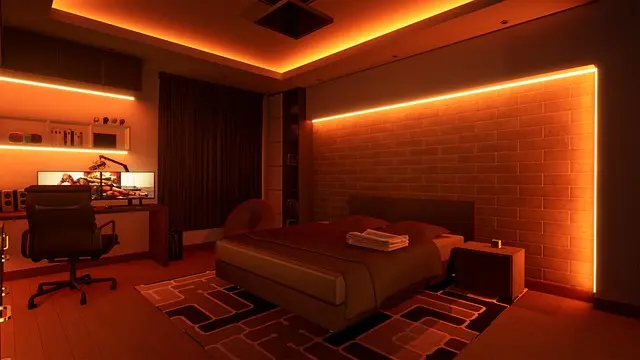
Before diving into the world of smart lighting, it’s crucial to assess your specific needs. Consider the areas in your home where smart lighting will be most beneficial. Are you looking to enhance security with motion sensor lights, or do you want to create a warm atmosphere for entertaining? By identifying your requirements, you can choose products that cater specifically to your lifestyle. According to data from UFC-Que Choisir, tailored lighting solutions can significantly improve energy efficiency and user satisfaction.
2. Start with Bulbs
A great starting point for smart lighting is smart bulbs. These devices offer a range of functionalities while being easy to install, making them perfect for beginners. Opt for bulbs that can change colour and adjust brightness to fit different moods and occasions. You can also integrate them with existing light fixtures without the need for significant rewiring. Users often report high satisfaction rates with these devices, thanks to their versatility and functionality.


3. Explore Smart Lighting Ecosystems
Different manufacturers provide various ecosystems, from Philips Hue to TP-Link systems. Each ecosystem offers unique features regarding compatibility, control options, and integration with other smart home devices. Before choosing your smart lighting products, check whether they are compatible with your home automation system, like Amazon Alexa or Google Home. This ensures a seamless experience where you can control all devices from a single platform.
4. Consider the Brightness
When selecting smart lighting, brightness is a crucial factor to consider. Lumens measure brightness, and it’s essential to choose bulbs that provide adequate lumens for the space they'll occupy. For instance, a reading nook might require a higher lumen rating compared to a hallway. According to interior design experts, a well-lit space can enhance productivity and mood dramatically. Aim for around 300-500 lumens for reading areas and less for ambient spaces.
5. Embrace Automation
One of the standout features of smart lighting is automation. Setting timers or schedules for your lights not only contributes to energy savings but also enhances security by simulating your presence when you’re away. You can program your lights to switch on at sunset or adjust automatically when you arrive home. This feature not only adds to comfort but is also noted for improving home security by making it look occupied even when you are not home.
6. Think About Energy Efficiency
Smart lighting is typically more energy-efficient than traditional lighting. Many products allow you to monitor energy usage and adjust settings to save on electricity bills. Look for energy-efficient bulbs, like LED options, to maximise savings. ADEME reports that LED bulbs use up to 80% less energy than incandescent bulbs, contributing to lower utility costs over time. Consider using smart lighting systems that provide energy usage reports to track your savings effectively.


ASUS TUF Gaming A16 Advantage Edition FA617XS-N4036W Laptop 40.6 cm (16") WQXGA AMD Ryzen 9 7940HS 16 GB DDR5-SDRAM 1 TB SSD AMD Radeon RX 7600S
Quzo UK
7. Create Scenes and Routines
Leveraging the capability of smart lighting allows you to create customised scenes and routines. For example, you could set a ‘movie night’ scene where the lights dim to a specific level, or a ‘wake up’ routine that gradually increases brightness, mimicking a natural sunrise. This flexibility not only enhances your lifestyle but also creates a more tailored atmosphere based on your preferences. Users frequently share their love for such personalised routines, stating they significantly improve their daily experiences.
8. Use Motion Sensors
Incorporating motion sensors into your smart lighting setup adds another layer of convenience and efficiency. These sensors can automatically turn lights on when you enter a room and off when you leave, saving energy and adding security. When strategically placed, motion sensors enhance accessibility, especially for elderly family members or those with mobility challenges. Reports indicate that these sensors improve safety while decreasing wasted energy significantly.
9. Trial and Adapt
When selecting your smart lighting products, consider starting with a few key areas in your home and expand from there. Testing various setups allows you to gauge what works best for your lifestyle before committing to a full-scale implementation. Personal experimentation is key, as preferences for lighting can differ widely from person to person. Some users recommend starting with a single room or area and expanding as you find what best suits your needs and preferences.
10. Stay Updated with Technology
The world of smart lighting is continuously evolving, with new products and features emerging regularly. Stay informed about the latest advancements in smart lighting technology to ensure your home remains cutting-edge. Subscribing to home improvement blogs or engaging with social media groups dedicated to smart home technologies can provide valuable insights and reviews of new products. Keeping in touch with community trends can lead to discovering innovative solutions tailored to your unique requirements.
📺 Resource Video
> 📺 For further exploration: Discover how smart lighting can revolutionise your home. Look for videos on YouTube with the keywords: "smart lighting tips 2026".
Glossary
| Terme | Définition |
|---|---|
| Smart Bulb | A light bulb that can be controlled remotely via smartphones or voice assistants. |
| Lumens | A unit of measure for the brightness of light emitted from a bulb. |
| Ecosystem | A collection of interlinked devices and systems that work together seamlessly to enhance home automation. |
Checklist avant achat
- [ ] Évaluer les besoins particuliers de mon espace.
- [ ] Considérer la compatibilité avec d'autres appareils.
- [ ] Choisir des ampoules en fonction de la luminosité requise.
- [ ] Explorer les options d'automatisation disponibles.
- [ ] Vérifier l'efficacité énergétique des produits choisis.
Recommended products
Selected by our experts

LG 27GS95QE-B computer monitor 67.3 cm (26.5") 2560 x 1440 pixels Quad HD OLED Black
Quzo UK

TCL NXTPAPER 14 Mediatek 256 GB 36.3 cm (14.3") 8 GB Wi-Fi 5 (802.11ac) Android 14 Grey
Back to the Office

ASUS TUF Gaming A16 Advantage Edition FA617XS-N4036W Laptop 40.6 cm (16") WQXGA AMD Ryzen 9 7940HS 16 GB DDR5-SDRAM 1 TB SSD AMD Radeon RX 7600S
Quzo UK

Samsung LS49CG934SU computer monitor 124.5 cm (49") 5120 x 1440 pixels Dual QHD OLED Silver
Back to the Office