Contents (10 sections)
Creating an efficient and inviting home office is essential in today’s remote work culture. One of the most significant aspects of this environment is the lighting. Proper lighting can boost productivity, reduce fatigue, and improve your overall mood. This comprehensive guide will navigate you through the essential elements involved in selecting the optimal lighting for your home office.
1. Understand the Importance of Lighting
Lighting doesn't merely illuminate the space but profoundly affects your productivity and comfort. Inadequate or harsh lighting can lead to eye strain, headaches, and decreased motivation. According to various studies, approximately 90% of office workers in the UK report that proper lighting is a key factor in their concentration and overall well-being. Soft, natural light tends to be the most ideal for enhancing mood and focus. We recommend aiming for an environment that mimics daylight to help maintain your circadian rhythms and provide a sense of well-being throughout your workday.
2. Identify Your Space and Needs
Before diving into types of lighting, you must evaluate your workspace. Consider its size, layout, and the activities you will most often engage in. Will you primarily be working on screens? Or might you also need to write or read physical documents?
- Size and layout: A larger office may benefit from overhead lighting combined with task lighting, ensuring all areas are well-lit. Conversely, small spaces can effectively utilise multi-functional lamps that provide both ambient and task lighting.
- Activities: If you use multiple screens, bright task lighting will help reduce glare. On the other hand, if you find yourself reading or writing, adjustable desk lamps will be more beneficial.
3. Layering Your Lighting
Layering is essential when it comes to effective home office lighting. The key types include ambient, task, and accent lighting:
- Ambient lighting: This is your main source of light, often provided by overhead fixtures. Ensure that it’s bright enough to prevent shadows but not so harsh that it causes discomfort.
- Task lighting: This includes desk lamps or focused lighting for specific work surfaces. They should provide directed light, reducing glare on screens and providing clarity for reading documents.
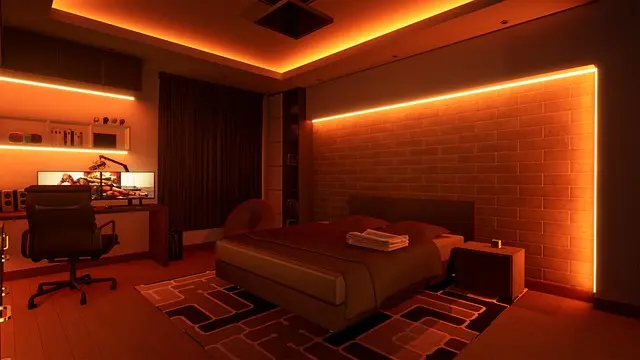
- Accent lighting: While not strictly necessary, accent lighting can enhance your office’s aesthetic appeal. This can be achieved through wall sconces or decorative lamps that create a more welcoming atmosphere.
Proper layering not only enhances visibility but also allows you to adapt the lighting based on the time of day and your current tasks.
4. Choosing the Right Bulbs
LED bulbs have emerged as the ideal choice for home office lighting due to their energy efficiency and longevity. When selecting bulbs, consider:
- Colour temperature: Measured in Kelvins (K), warm white (3000K) offers a cozy atmosphere suitable for relaxation, while cool white (4000K-5000K) can enhance concentration, making it ideal for workspaces.
- Lumens: Understand the brightness you require. A standard desk lamp may need at least 500 lumens, whereas general ambient light may require more depending on room size.
It's vital to avoid overly bright bulbs that can cause eye strain. Instead, focus on creating a balanced light environment that feels comfortable over extended periods.
5. Consider Smart Lighting Solutions
Smart lighting options are increasingly becoming popular in home offices for their convenience and versatility. With smart bulbs or connected lighting systems, you can control brightness and colour temperature through your smartphone. This allows for seamless transitions as the natural light changes throughout the day, keeping your workspace dynamic and adaptable.
Moreover, dimmable lights can be installed to allow you to adjust the intensity based on your task or time of day, reducing glare while enhancing focus. Integrating smart lighting can also help sync your work environment with your productivity rhythms, which can further boost concentration.
6. Ergonomics and Positioning
No matter how great your lighting is, positioning is key. Ensure that:
- Light sources do not create glare on screens. Position lights to the side or behind your workstation.
- Desk lamps should be placed so they illuminate your work area but not your eyes directly.
Utilising adjustable or flexible light fixtures allows you to tailor the light's direction. This adaptability can help create the perfect setting as it relates to your tasks, reducing eye strain and enhancing overall comfort.
Checklist before Purchase
- [ ] Assess the dimensions of your office space
- [ ] Identify activities you’ll be doing in the space
- [ ] Evaluate current lighting needs
- [ ] Research and consider LED options
- [ ] Explore smart lighting solutions for convenience
Glossary
| Terme | Définition |
|---|---|
| Lumens | Mesure de la luminosité d'une ampoule. Plus le nombre de lumens est élevé, plus la lumière est vive. |
| Kelvins (K) | Unité de mesure de la température de couleur de la lumière. Indique si la lumière est chaude (jaune) ou froide (bleue). |
| Ergonomie | Science qui étudie la relation entre les humains et leurs environnements de travail, visant à améliorer le confort et la productivité. |
> 💡 Avis d'expert : Selon des tests menés par UFC-Que Choisir, les utilisateurs ayant des environnements de travail bien éclairés se sentent 25% plus productifs et moins fatigués.
📺 Pour aller plus loin : Comment optimiser l'éclairage de votre bureau à domicile, une analyse complète de l'importance de l'éclairage dans vos espaces de travail. Recherchez sur YouTube : "optimiser éclairage bureau à domicile".

Ruma Grey Self Lined Linen Drum Lamp Shade for Table Lamps & Floor Lamps Grey
debenhams.com


Samsung Galaxy Book6 (16", Core Ultra 7, 16GB), a Copilot+ PC
Back to the Office
Ressources et produits recommandés
Nous avons sélectionné plusieurs produits adaptés pour vous aider à créer l’éclairage parfait. Découvrez nos recommandations ci-dessous.
📺 Pour aller plus loin : optimiser éclairage bureau à domicile sur YouTube
Recommended products
Selected by our experts


TP-Link Archer GE400 BE6500 wireless router 2.5 Gigabit Ethernet Dual-band (2.4 GHz / 5 GHz)
Back to the Office


TP-Link Archer GXE75 wireless router 2.5 Gigabit Ethernet Tri-band (2.4 GHz / 5 GHz / 6 GHz)
Back to the Office

TP-Link EAP650-DESKTOP wireless access point 2976 Mbit/s White Power over Ethernet (PoE)
Back to the Office