Contents (19 sections)
As technology continues to advance, smart lighting systems have emerged as a popular choice for homeowners seeking both convenience and energy efficiency. These intelligent lighting solutions offer a variety of features that not only enhance the ambiance of a space but also contribute to a more sustainable lifestyle. With the ability to control light settings remotely and automate lighting functionalities, smart lighting can significantly improve daily living.
What are Smart Lighting Systems?
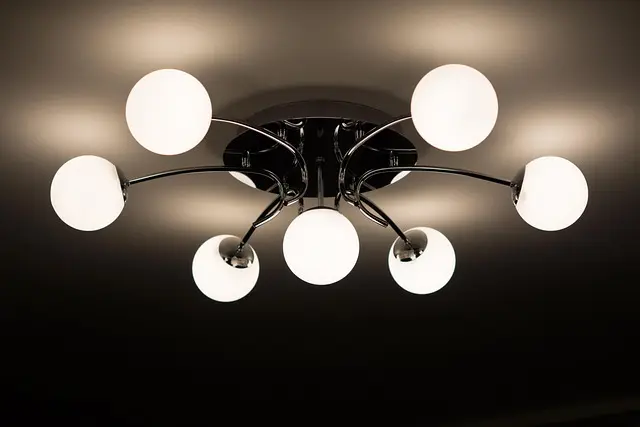
Smart lighting systems are integrated lighting solutions that connect to a central hub or app, allowing users to control their lights remotely. Typically, these systems utilise Wi-Fi or Bluetooth technology to communicate with smartphones, tablets, or smart home systems. They can include various products such as smart bulbs, light strips, and ceiling fixtures that can be programmed to suit individual preferences.
Types of Smart Lighting
There are various types of smart lighting available on the market today:
- Smart Bulbs: These are the most common types of smart lighting. They can be fitted into existing fixtures and controlled through an app, allowing for brightness and colour adjustments.
- Smart Switches: These replace traditional light switches, enabling full control over non-smart bulbs within the home.
- Smart Strips: Flexible lighting solutions that can be placed in various locations to create dynamic lighting environments.
As UFC-Que Choisir mentions, smart bulbs can offer bright, vibrant colours while significantly reducing energy consumption compared to traditional incandescent bulbs, making them an eco-friendly alternative.
Benefits of Integrating Smart Lighting into Your Home
The integration of smart lighting systems into homes offers numerous benefits:
- Energy Efficiency: A major advantage of smart lighting is its ability to conserve energy. According to a study by Energy Star, energy-efficient lighting can use up to 75% less energy than traditional incandescent bulbs. Smart lighting systems can automatically turn off or dim lights when not in use, significantly reducing electricity bills.
- Enhanced Convenience: With the use of mobile applications, homeowners can control their lighting from anywhere. Imagine getting home from work and adjusting your home’s lighting to your preferred setting before you walk through the door.
- Customisation: Many smart lighting systems allow for extensive customisation. You can create your light scenes based on the time of day, mood, or activity—transforming your living space for everything from movie nights to dinner parties.
- Increased Security: Smart lighting can enhance the security of your home. Timed lighting schedules can make it appear as if someone is home, deterring potential intruders. Moreover, some systems can integrate with security cameras and alarms, providing an additional layer of safety.
💡 Expert Opinion: According to lighting designer Jane Smith, "The integration of smart lighting not only enhances aesthetic appeal but also brings a level of efficiency that can positively impact energy bills."

Samsung Galaxy Book6 (16", Core Ultra 7, 16GB), a Copilot+ PC
Back to the Office

Samsung Galaxy Book6 (16", Core Ultra 5, 16GB), a Copilot+ PC
Back to the Office

TP-Link InSight S385PI Bullet IP security camera Outdoor 3840 x 2160 pixels Wall
Back to the Office
How to Set Up Smart Lighting in Your Home
Setting up a smart lighting system can be quite straightforward, especially if you follow these step-by-step instructions:
Step 1: Choose Your Smart Lighting Products
Based on your needs, select from smart bulbs, switches, and strips. Make sure they are compatible with your smart home ecosystem (e.g., Amazon Alexa, Google Assistant).
Step 2: Install the Devices
Replace your existing bulbs with smart ones, or install smart switches as needed. Ensure that your Wi-Fi connection is stable and that your app is functioning correctly.
Step 3: Connect to Your Home Network
Follow the manufacturer’s instructions to connect the lighting products to your home Wi-Fi. Use the dedicated app to set up the devices and create an account if necessary.
Step 4: Configure Settings and Automations
Once operational, configure the settings as per your preference. Most apps allow scheduling, creating scenarios, and setting up voice commands for hands-free control.
Step 5: Integrate with Other Smart Devices
If you have a smart home setup, integrate your smart lighting with other devices such as thermostats or security systems to enhance functionality.
Comparison of Popular Smart Lighting Systems
Comparing different smart lighting options helps consumers make informed choices. The table below outlines key features:
| Feature | Smart Bulbs | Smart Switches | Smart Strips | Verdict |
|---|---|---|---|---|
| Installation Ease | Simple | Moderate | Simple | Smart bulbs are the easiest to install, but switches require some electrical work. |
| Customisation Level | High | Low | High | Both bulbs and strips offer extensive customisation. |
| Energy Efficiency | High | Moderate | High | All options provide improved efficiency, especially bulbs. |
| Compatibility | Broad | Specific | Broad | Compatibility varies; check compatibility before purchase. |
What are the main advantages of using smart lighting?
Smart lighting provides energy efficiency, increased home security, and enhanced convenience through remote control and customisation options.
Can existing lights be converted to smart lights?
Yes, by using smart bulbs or smart switches, you can convert existing fixtures to smart lighting without significant changes.
How do smart lighting systems improve home security?
By automating lighting schedules and integrating with security systems, smart lighting can simulate occupancy, deterring potential intruders.
Are smart lights expensive?
The initial investment can be higher than traditional lighting, but the long-term energy savings make them a cost-effective solution.
Glossary
| Terme | Définition |
|---|---|
| Smart Bulb | An LED bulb that can be controlled remotely via a smartphone app or voice commands. |
| Home Automation | The control of home appliances and systems through the internet, enabling remote operation. |
| Energy Efficiency | The goal of using less energy to provide the same service, improving sustainability. |
Checklist before Purchase
- [ ] Determine compatibility with existing systems
- [ ] Compare features among different brands
- [ ] Assess energy efficiency ratings
- [ ] Read user reviews for insights
- [ ] Confirm warranty and return policies

TP-Link VIGI InSight S445ZI Turret IP security camera Outdoor 2688 x 1520 pixels Ceiling
Back to the Office

TP-Link INSIGHT S345-4G Bullet IP security camera Outdoor 2688 x 1520 pixels Wall
Back to the Office

TP-Link InSight S285 Dome IP security camera Outdoor 3840 x 2160 pixels Ceiling
Back to the Office
📺 Resource Video
For those interested in learning more, check out Understanding Smart Lighting Systems on YouTube. Search for: smart lighting systems overview 2026.
📺 Pour aller plus loin : smart lighting systems overview 2026 sur YouTube
Recommended products
Selected by our experts

TP-Link INSIGHT S445 Turret IP security camera Outdoor 2688 x 1520 pixels Ceiling
Back to the Office

TP-Link INSIGHT S455 Turret IP security camera Outdoor 2880 x 1620 pixels Ceiling
Back to the Office

TP-Link INSIGHT S485 Turret IP security camera Outdoor 3840 x 2160 pixels Ceiling
Back to the Office

TP-Link InSight S655I IP security camera Indoor 2560 x 1920 pixels Ceiling/wall
Back to the Office

TP-Link INSIGHT S385 Bullet IP security camera Outdoor 2880 x 1620 pixels Wall
Back to the Office

TP-Link InSight S245 Dome IP security camera Outdoor 2688 x 1520 pixels Ceiling
Back to the Office